

Appearance
Export to Git
Push customisations from this site into your target app's repo, on a named branch, with a per-doctype diff preview.
The flow
Open /app/custom_migrator
Sidebar tree of configured DocTypes on the left, item list on the right.
Pick items
Tick what you want. Use the Select by Type ▾ menu to bulk-select across pages, or the sidebar Select All / Deselect All link.
Migrate Selected → review the Export Preview
Per-doctype counts of + NEW (green), ~ MOD (orange), = SAME (muted). Top of dialog shows the overall summary.
Pick one of two actions
Export & Commit opens the git dialog. Export Only writes the JSON files to your target app's working tree and stops — no branch, no commit, no push.
Name the branch + review the AI commit message
Branch field is auto-filled with migration/YYYY-MM-DD-HHMMSS. Commit message is AI-generated from your selected items and their diffs — edit freely before push. Optional Release Tag for tag-on-push.
Commit & Push (runs in the background, 5 minute timeout)
A progress dialog walks through 7 named steps. Realtime updates while it runs; polling fallback after 3s if WebSocket isn't reachable.
TIP
Close the tab during a push? When you come back to /app/custom_migrator, the progress dialog reopens automatically as long as the push is still in flight (within 30 minutes of starting and owned by you).
The main page toolbar
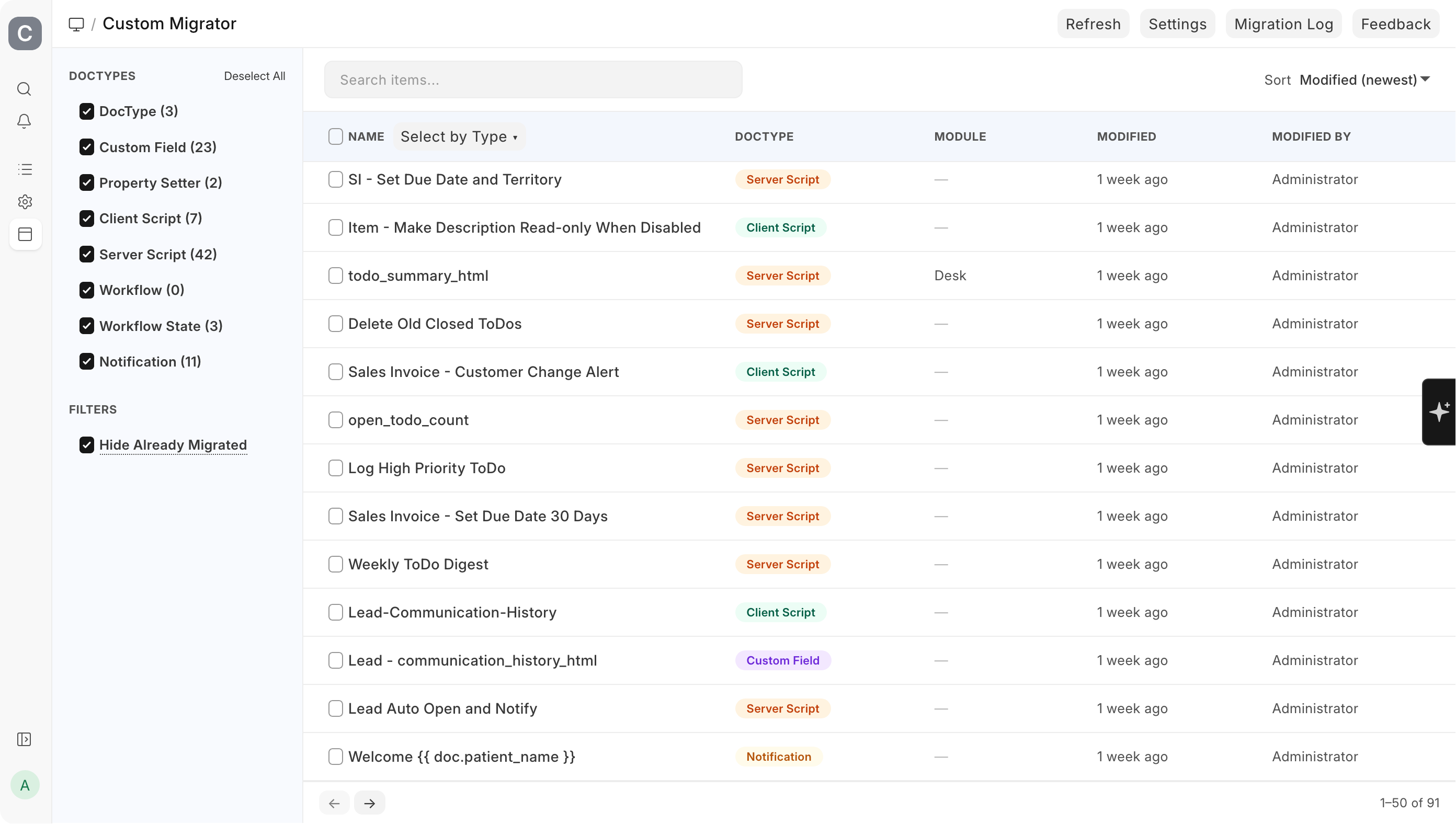
| Control | What it does |
|---|---|
| Refresh | Reloads counts and the hide-already-migrated filter. Bypasses the 60s fetch cache so you see remote state up to this second. |
| Settings | Jumps to /app/migrator-settings. |
| Migration Log | Jumps to /app/migration-log. |
| Search items… | Client-side text filter on the rendered list. |
| Sort | Modified (newest / oldest), Name (A→Z / Z→A). Default: Modified (newest). |
| Hide Already Migrated ✓ | Default ON. Hides items already tracked: either matching an item at the tip of origin/<base_branch> in your target app's repo, or shipped by some other installed app (ERPNext, HRMS, Frappe, etc.). Untick to see everything including app-owned items. |
| Pagination | 50 items per page, hidden when total ≤ 50. |
| Select by Type ▾ | Bulk-select across pages by doctype. |
The Export Preview dialog
Shown after you click Migrate Selected. Title: Export Preview.
Each doctype gets a single line with up to three coloured badges. No items are hidden, no field-level diff is drawn — this is a summary view to confirm scope before you write to disk.
| Badge | Glyph | Colour | Means |
|---|---|---|---|
NEW {n} | + | Green | Item not yet present in the target app's committed custom/ or fixtures/ files |
MOD {n} | ~ | Orange | Item exists but its canonical hash differs from what's committed |
SAME {n} | = | Muted | Item exists and content matches — exporting it would write a byte-identical file |
Top of the dialog: Summary: {N} new, {N} updated, {N} unchanged.
Two action buttons:
- Export & Commit (primary) — opens the git dialog.
- Export Only (secondary) — writes the JSON files to your target app on disk and stops. Useful when you want to inspect the diff manually before deciding on a branch. Items only hide from the list after a successful push, because that's when
origin/<base_branch>changes.
The git dialog (Commit & Push)
| Field | Default | Notes |
|---|---|---|
| Target info banner | — | Shows target app, remote URL, and a ✓ Authenticated or ⚠ No PAT indicator |
| Select Branch | Create New Branch | Dropdown populated with remote branches; pick an existing one to push onto it |
| New Branch Name | migration/YYYY-MM-DD-HHMMSS | Only shown when "Create New Branch" is selected. Auto-filled with the current timestamp; edit freely |
| Commit Message | AI-generated from the selection | Required. See AI commit messages below |
| Release Tag (Optional) | — | If set, a git tag of this name is pushed after the branch |
Primary action: Commit & Push. No secondary action.
AI commit messages
When you open the git dialog, Migrator drafts the commit message from:
- The customizations you selected — names, DocTypes, and scope of the export
- Their diffs — what actually changed vs the target app's committed fixtures
The prompt is tuned to:
- Correlate related intent — e.g. a Custom Field, Property Setter, and Client Script that implement one feature are described as one change, not three unrelated bullets
- Avoid false correlation — unrelated selections stay separate in the message so history does not invent a story that was never there
You can edit the draft before Commit & Push. The first line also seeds the default PR title when you create a pull request.
Branching rules
- New branch off your Base Branch if the chosen name doesn't exist remotely
- If the branch already exists remotely, your changes rebase onto its tip
- Branch names allow only
A-Z a-z 0-9 . _ / -, max 128 chars, no..— invalid names are rejected with a clear error before the worker touches git
What happens to your working tree
The push runs on a clean copy of your base branch. Before exporting, the worker:
- Stashes everything dirty in the target app's working tree (committed and untracked)
- Recreates the target branch from the remote base
- Exports the selected items, commits, pushes
- Returns the working tree to where you left it and pops the stash
You can have whatever local state you want in the target app. It's preserved.
Final outcomes
| Outcome | What you see |
|---|---|
| Pushed (new commits) | One of the PR flows below, depending on PAT scopes |
| Already up to date | Title Already Up to Date (blue): nothing was committed — your selection produces byte-identical files |
| Push failed | Title Push Failed (red): the worker's error message |
| Timeout | Title Push Timeout (orange): the worker is still running; check Migration Log |
Create a PR (when the push had real changes)
If your PAT has pull_requests:write and a Base Branch is configured, the success flow checks for an existing open PR first:
| Situation | What you see |
|---|---|
| No existing PR for this branch | A Create Pull Request dialog opens. Title field defaults to the first line of your commit message (or Migration: {branch}). Body field is pre-filled with a ## Migration Changes template including your summary and details. Create PR button posts it via the GitHub API; Skip dismisses the dialog. |
| PR already open for this branch | Title Pushed to Existing PR (green) with a button View PR #N on GitHub →. Your new commits land on the existing PR — no new PR is created. |
| PR creation returns 422 (race: another process opened one) | Title PR Already Exists (blue) with Open Existing PR #N → |
| PR creation errored | Title PR Creation Failed (orange). Body: the error + "Your code was pushed to {branch}. Create the PR manually on GitHub." The push itself is unaffected — the branch is live on the remote |
If your PAT only has contents:write (no PR scope), no PR dialog opens. You get a plain Success (green) message: Pushed to {target_app}/{branch} ({hash}). Open the PR manually on GitHub.
Once the PR is merged, pull and run bench migrate on the target site to apply.