

Appearance
Setup
Custom Migrator moves your ERPNext customizations from one site to another — it sanitizes export JSON (strips site metadata), runs Semgrep against Frappe coding standards and common injection risks, diffs source and target, and migrates through a feature-aware git merge with AI commit messages drafted from the selected items and their diffs. A completeness check makes sure nothing is missed. (What it moves →)
Install the app
On Espresso it's installed for you. Self-hosting? bench get-app + install-app.
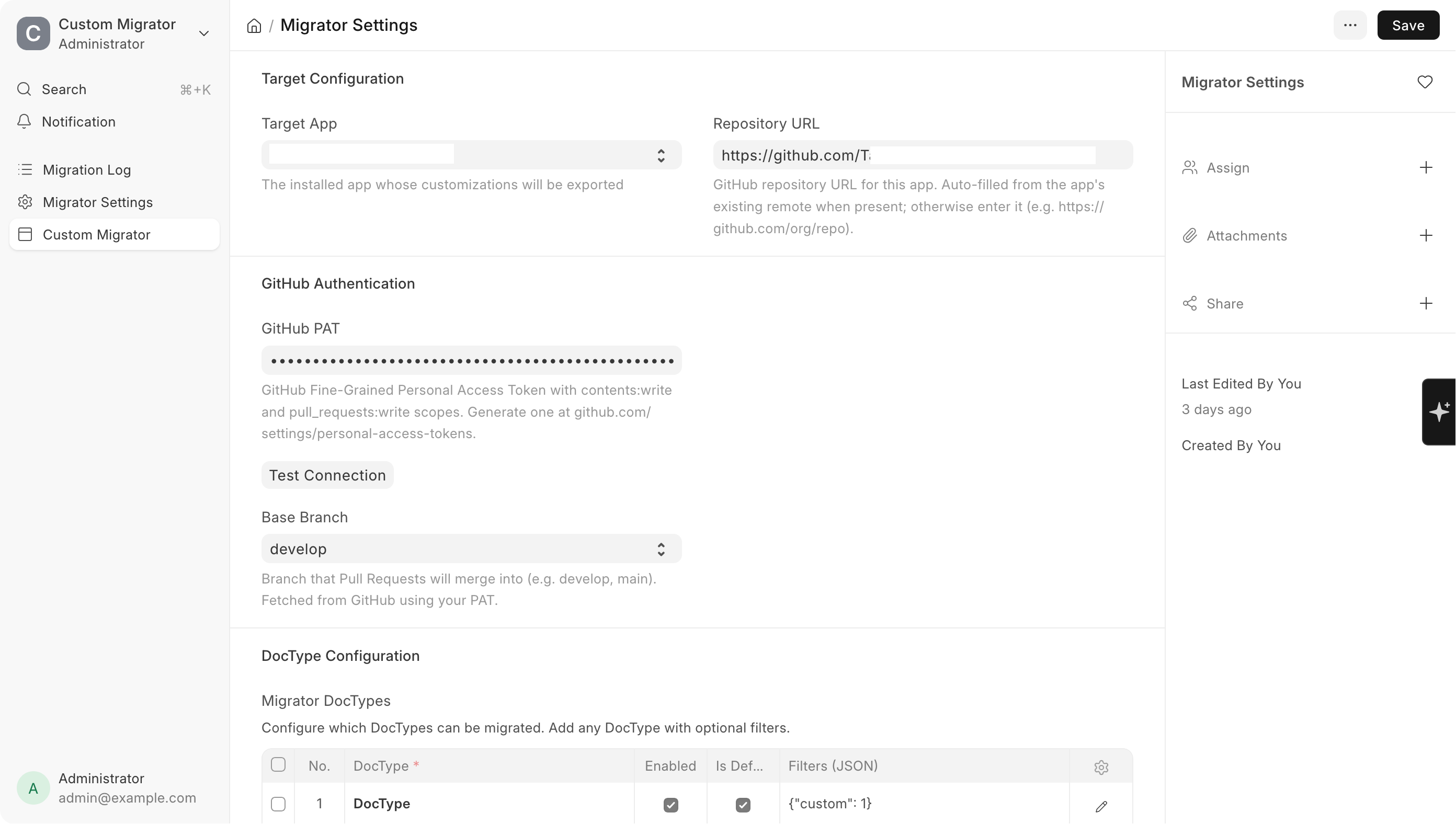
Fill in Migrator Settings
GitHub PAT, target app, base branch.
Test Connection
Green pill = the PAT can reach the remote. You're done.
1. Configure
Open /app/migrator-settings.
Git Configuration
| Field | What to enter |
|---|---|
| GitHub PAT | A fine-grained PAT with contents:write and pull_requests:write scopes on the target repo |
| Remote URL | Auto-detected from the repo. Edit to override |
Target Configuration
| Field | What to enter |
|---|---|
| Target App | The app whose repo receives the customisation files |
| Base Branch | The branch your PRs merge into (usually develop or main) |
DocType Configuration
The Migrator DocTypes child table controls what types appear in the sidebar tree on /app/custom_migrator. Add rows for anything beyond the eight defaults.
IMPORTANT
Hydra User can run migrations but can't open Settings. Settings is restricted to System Manager and Hydra Admin.
If the target app has no .git directory
Common in Docker deployments. An Initialize Git Repository button appears under Target App. Fill in Remote URL first, then click. Your existing files aren't touched.
2. Test Connection
Click Test Connection on the form.
| Pill | Means |
|---|---|
| Green ✓ | Auth works, remote reachable |
| Red ✗ | Detail in the banner: auth failed / remote not found / target app not selected / no PAT |
Where you'll find things after install
| Page | URL |
|---|---|
| Migrator desk page | /app/custom_migrator |
| Migrator Settings | /app/migrator-settings |
| Audit log | /app/migration-log |
FAQ
Do I need to install anything? On Espresso, no — Custom Migrator comes with your setup.
What does it move (and not move)? Customizations — Custom Fields, Property Setters, Client/Server Scripts, Workflows, custom DocTypes, Notifications. It does not move business records (Customers, Invoices) or app code.
What's a PAT, and where do my changes go? A GitHub Personal Access Token lets the Migrator push to your repo and open a pull request. Your changes land on a branch as a PR you review and merge — nothing is force-pushed.
Can I undo a migration? Yes — every export is a PR, so nothing changes on the target until you merge. Don't merge it (or revert the merge) to undo.